
E-book Usage Tutorial
WARNING
This lists readers that support the Lingkuma plugin. Epub and PDF files outside of these are not actively supported.
Epub Readers
ttsu web epub reader
TIP
Cons: Some epub files cannot be loaded.
Publish Epub to telegra.ph
TIP
Plugin -> Settings -> Epub conversion tool for automatic publishing. The purpose is to convert epub to a pure web page, making it fully compatible with Lingkuma across all platforms.
Plugin Built-in Epub Processing Script
TIP
- Format fixing: If the epub text size and style cannot be customized, this method can be tried.
- Chapter splitting: Facilitates publishing to telegra.ph or reduces the amount of text per chapter, reducing potential lagging.
- Japanese ruby furigana cleanup: Can fix highlighting and text acquisition errors when looking up words.
PDF Readers
Mozilla PDF web reader
https://mozilla.github.io/pdf.js/web/viewer.html
TIP
Cons: No bookshelf UI, requires re-importing every time.
Readest Reader
TIP
Pros: Supports Epub, PDF, and book management. Cons: iOS is not compatible with Lingkuma highlighting.
PC Settings Recommendation
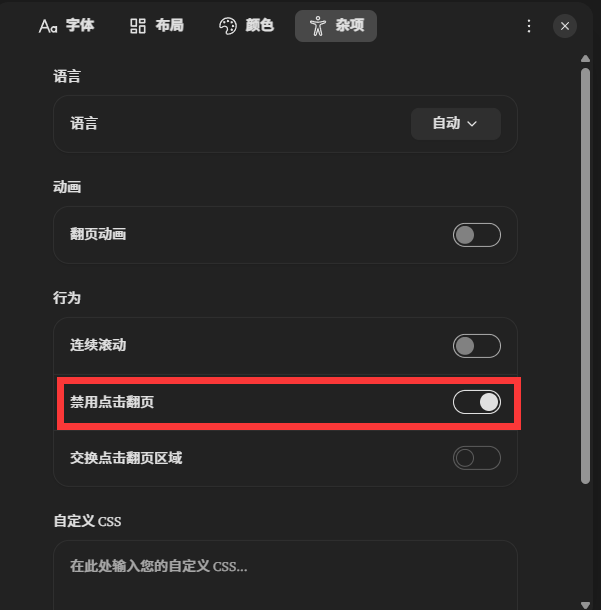
Only disable tap-to-turn-page. When highlighting is on the first or last line, it will trigger translation. Disabling it solves this.
Android Devices
Android Phone
TIP
Same as above, disable tap-to-turn-page.
TIP
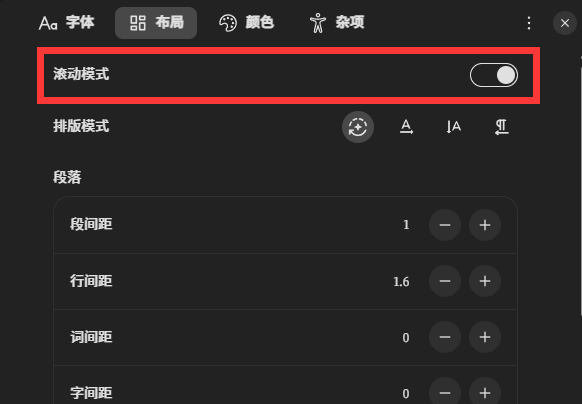
Please make sure to enable scroll mode. If not enabled, the pop-up window may not display completely.
TIP
You can still tap the top left empty edge to trigger the previous page and the bottom empty edge to trigger the next page.
Android Tablet
TIP
Same configuration as Android phone.
TIP
Tablets may not trigger taps on empty space. You can tap anywhere to bring up the progress panel, which has page turning buttons on the left and right.
